Product Updates
From fresh features to behind-the-scenes improvements, this is where you'll find every update that makes our product faster, smarter, and better for you. Check back often — we're always building something new.
-
05 Aug 2025👥 Assign a Sales Person to an Estimate
- Desktop App
- Feature Update
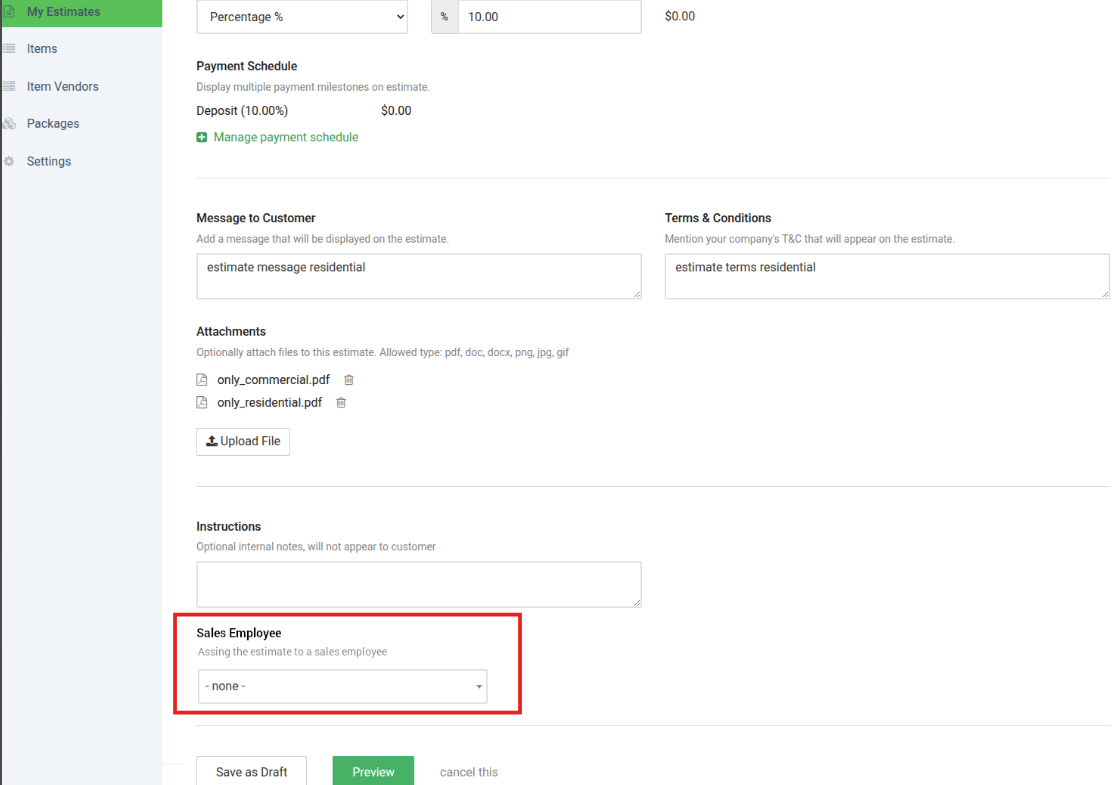
We’ve added a new feature that gives you more control over who is responsible for each estimate.
What’s new:
-
Assign or Reassign Sales Person: Office Managers, Owners, and Partners can now assign an estimate to a specific Sales Person, instead of it always being tied to the creator.
-
Default Assignment for Sales: If a Sales Person creates an estimate, it will automatically be assigned to them.
- Role-Based Permissions: Only Owners, Partners, and Office Managers can change or reassign the Sales Person. Sales staff cannot assign themselves to estimates they did not create.
This update helps improve accountability, streamline follow-ups, and maintain a clear record of estimate ownership.
-
04 Aug 2025📢 New Feature Update – View Declined Messages from Customers
- Feature Update
- Announcement
📢 New Feature Update – View Declined Messages from Customers
We’ve made an improvement to our system!
You can now see the customer’s message when they decline an estimate in the email sent directly in your account. This update gives you more context on why an estimate was declined, helping you follow up quickly and effectively.How it helps you:
-
Understand customer feedback instantly
-
Save time by avoiding back-and-forth messaging
-
Improve your estimates based on direct customer input
Learn More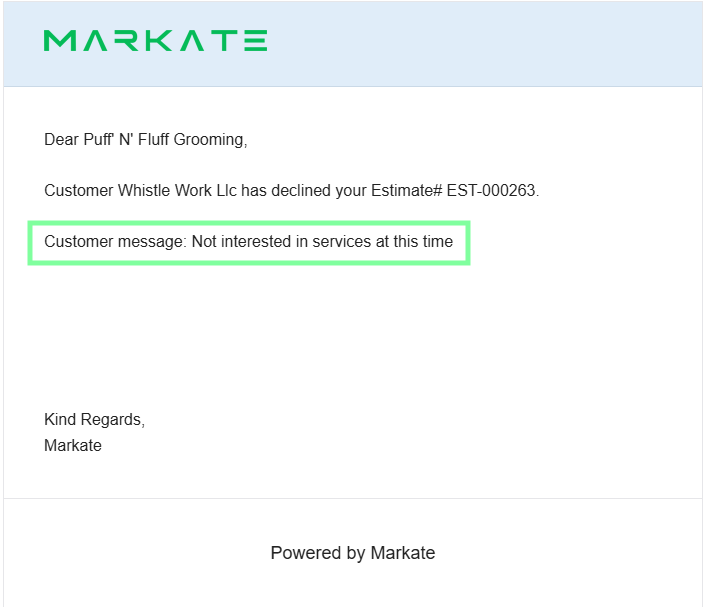
-
01 Aug 2025💲 Update: SMS Blast Pricing
- Desktop App
- Announcement
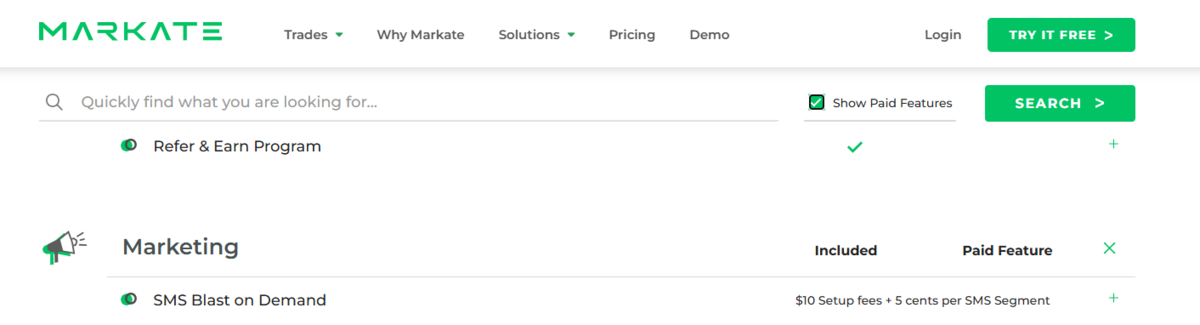
We’ve updated our pricing display for SMS Blasts:
-
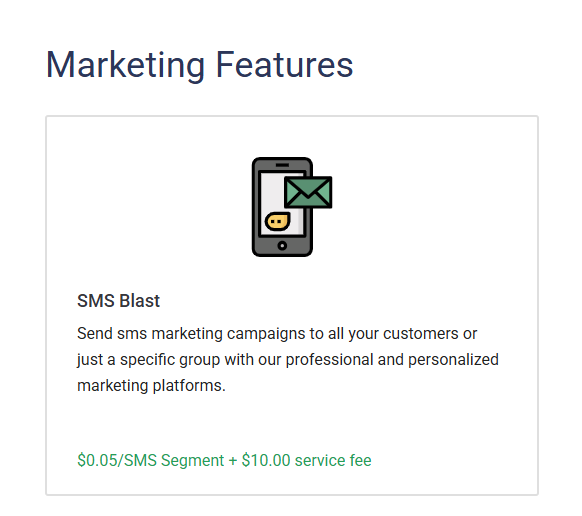
Pricing now clearly shows $0.05 per SMS segment (previously displayed as $0.05/SMS).
-
All relevant pages now reflect the updated rate and terminology for better clarity.
This ensures transparent pricing and helps you understand exactly how SMS segments are billed.
-
31 Jul 2025New Feature Release: Bulk Delete Leads Pipeline!
- Desktop App
- New Feature
🚀 New Feature Release: Bulk Delete Leads Pipeline!
We’re excited to announce a powerful new addition to your workflow: the Bulk Delete Leads Pipeline feature. You can now easily select and delete multiple leads at once, saving you time and streamlining your lead management process.
Key Highlights:
Select multiple leads with a single click using the new multi-select toggle.
Quickly remove unwanted leads in bulk—no more deleting one by one!
Consistent design and functionality with other bulk actions in the platform.
Learn More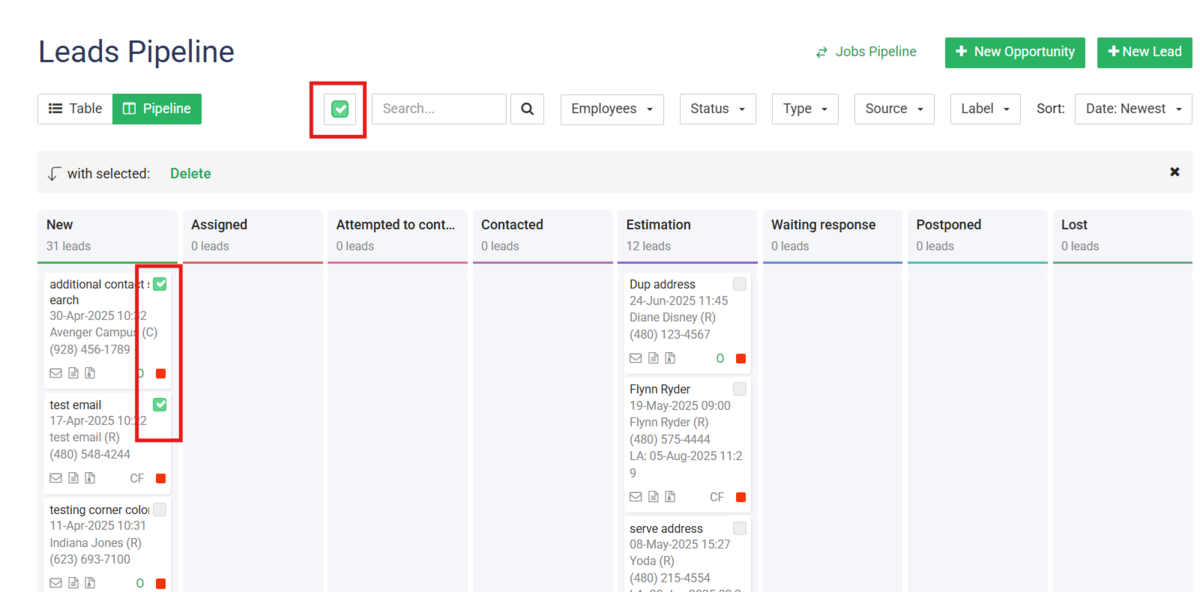
-
31 Jul 2025🐞 Bug Fix – Recurring Invoice Location Display
- Announcement
- Bug Fix
🐞 Bug Fix – Recurring Invoice Location Display
We’ve fixed an issue where job locations were not displaying on child recurring invoices.
What’s changed:
-
Job location now displays correctly on all recurring invoices
-
Improves clarity for both you and your customers
-
No action needed—your invoices will now show the correct location automatically
-
02 Jul 2025📝🎉 Feature Update – Detailed Activity Log Updates
- Desktop App
- Feature Update
- Announcement
📝🎉 Feature Update – Detailed Activity Log Updates
Our Activity Log just got smarter!
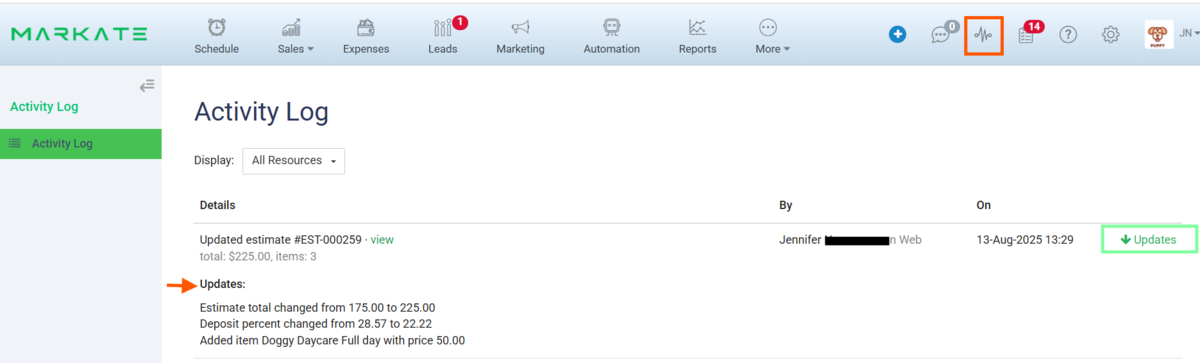
You can now see exactly what changes were made to your records—giving you clearer insights and a better audit trail.What’s new:
-
View specific details of edits and updates
-
Track who made the change and when
-
Improve team accountability and transparency
This enhancement is live now—check your Activity Log to see the difference!
-
27 Jun 2025📢 New Feature – Bulk Price Increase Option
- Desktop App
- Announcement
- New Feature
📢 New Feature – Bulk Price Increase Option
Updating your pricing just got faster!
You can now apply a bulk price increase to multiple items at once by either a flat $ amount or percentage %—saving you time and ensuring consistency across your services or products.Benefits:
-
Adjust prices for many items in one step
-
Keep your pricing up to date effortlessly
-
Reduce manual work and avoid errors
🎉Head to your item list to try it out!
-
27 Jun 2025💬🎉 Feature Update – SMS Blast Character Count
- Desktop App
- Feature Update
- Announcement
💬🎉 Feature Update – SMS Blast Character Count
We’ve updated how character counts work for SMS Blasts to help ensure your messages are delivered as intended.
Important:
-
Avoid using special characters and emojis in your SMS Blasts
-
These can increase your character count and may cause your message to split into multiple texts which will result in additional charges
-
Keep messages simple to stay within the standard character limit
- When building SMS you can view the character count below the box
💡 SMS Blast Tip:
Avoid special characters and emojis — they use extra characters and may split your text into multiple messages. Keep it simple for best delivery!
Learn More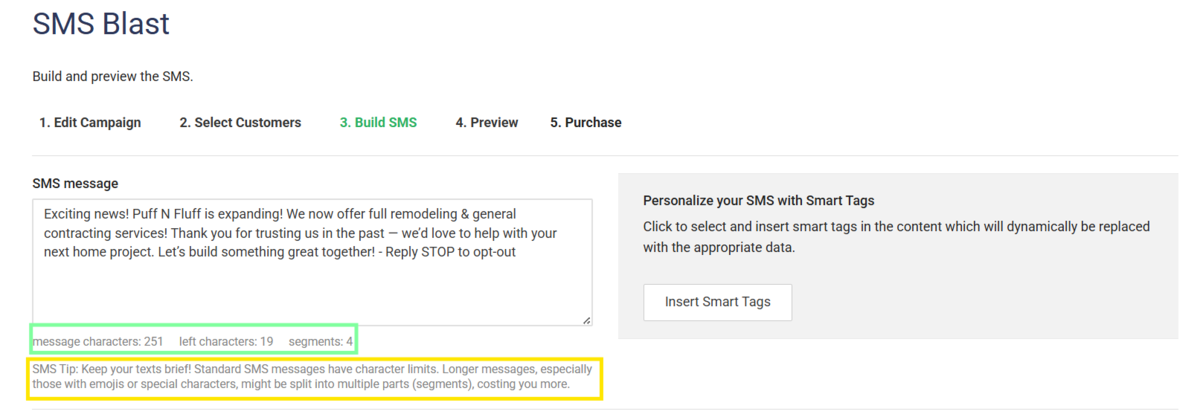
-
29 May 2025Bug Fix: Work Order Notes to Invoice
- Desktop App
- Mobile App
- Bug Fix
Bug Fix: Work Order Notes Now Carry Over to Invoices!
We’re excited to announce that we’ve resolved the issue where notes added in the Work Order (WO) “Details” section were not appearing on the corresponding invoice. Now, when you add a note to the new “Message to Customer” field in a WO, it will automatically carry over to the invoice when converted. This ensures your customers receive all the important information you want to share with them.
Learn More -
27 May 2025📝 New Feature – Clone Estimates for Leads
- Desktop App
- Announcement
- New Feature
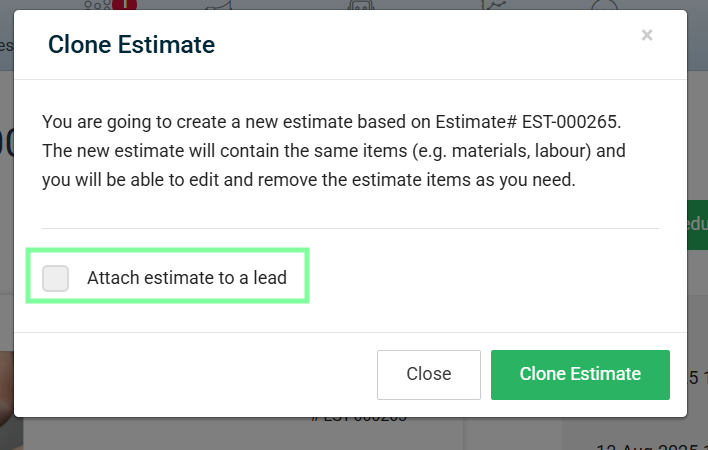
📢 New Feature – Clone Estimates for Leads
We’ve made sending estimates even faster!
You can now clone an existing estimate and send it directly to a lead—perfect for saving time when creating similar proposals.Benefits:
-
Quickly reuse past estimates without starting from scratch
-
Maintain consistency in pricing and formatting
-
Speed up your response time to new leads
- Available on Desktop Only
This feature is available now—just open an estimate and select more, Clone Estimate to get started!
-
15 Apr 2025Introducing Kate!! smart AI receptionist
- Announcement
- New Feature
Exciting news! We're thrilled to announce the launch of Kate, our fantastic new AI Receptionist, designed to revolutionize how you connect with your customers!Ready to streamline your customer communication and provide seamless support 24/7?Simply fill out the form below, and our team will reach out to you to set up this incredible feature to try for free!Don't miss this opportunity to leverage the power of AI and enhance your business efficiency at no extra cost during this introductory phase.We're confident Kate will be a game-changer for your business!
Learn More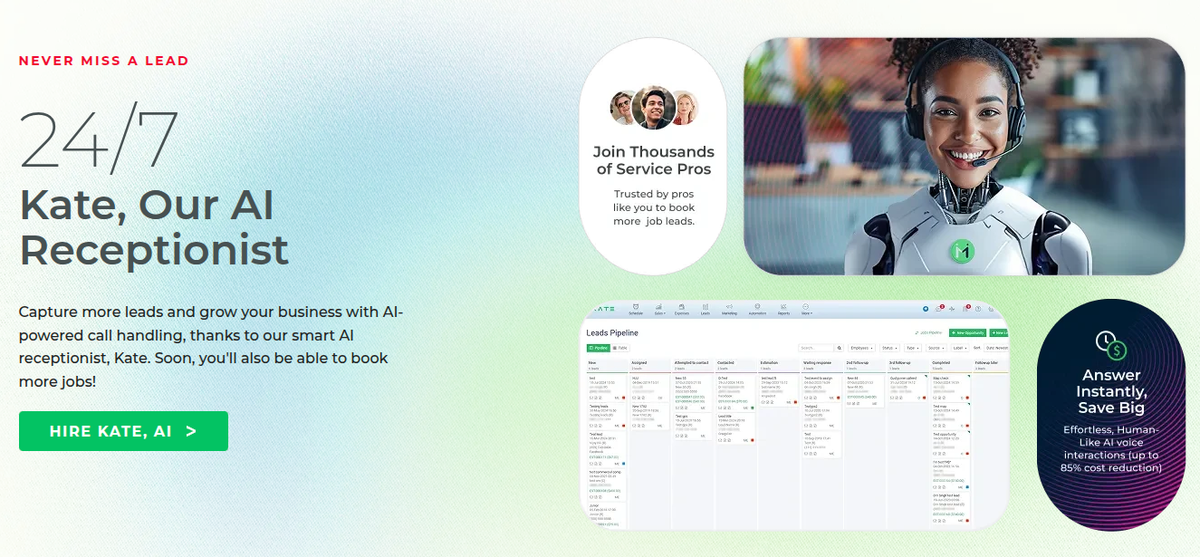
-
14 Mar 2025📢 New Feature – Bulk Add Customers to Groups
- Desktop App
- Feature Update
- Announcement
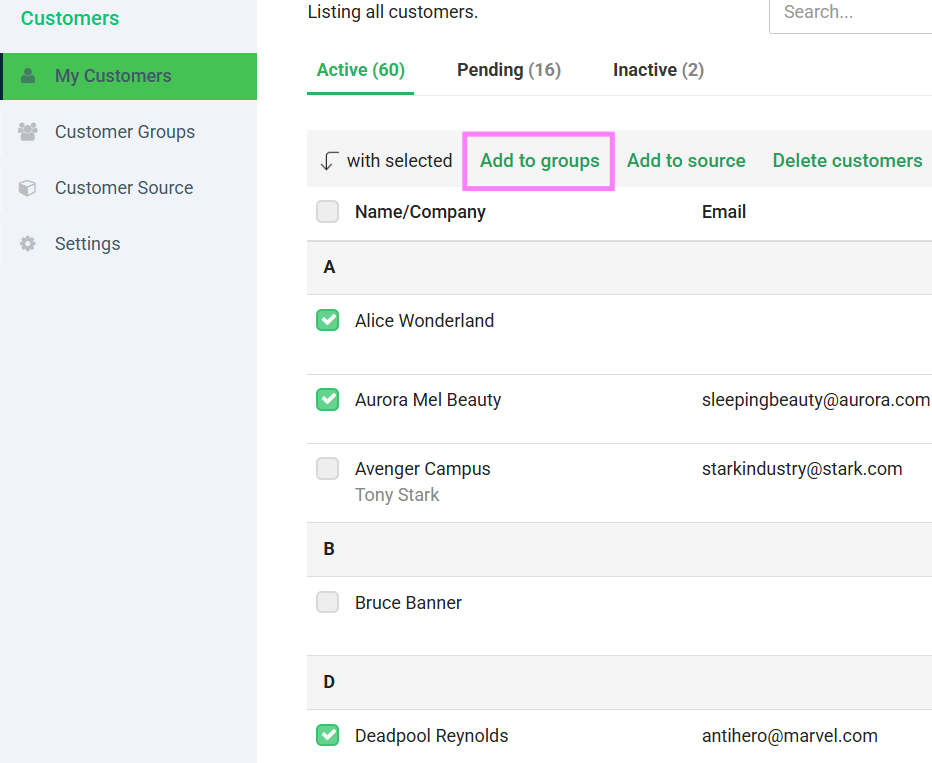
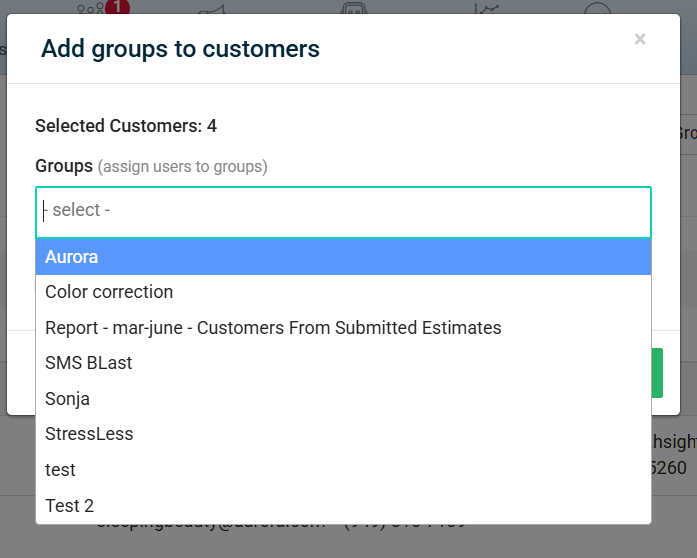
📢 New Feature – Bulk Add Customers to Groups
Managing your customer lists is now easier than ever!
You can now add multiple customers to a group at once—perfect for organizing contacts for marketing, notifications, or reporting.What this means for you:
-
Save time by grouping customers in bulk
-
Keep your lists organized and up to date
-
Quickly target the right audience for campaigns or updates
-
05 Mar 2025📢 New Feature – Blocked Events Now Export to Google Calendar
- Feature Update
- Integration
- New Feature
📢 New Feature – Blocked Events Now Export to Google Calendar
We’ve added a highly requested feature!
You can now export your blocked events directly to Google Calendar, making it easier to keep your schedule organized across platforms.What this means for you:
-
See blocked times right alongside your other appointments in Google Calendar
-
Avoid double-booking and scheduling conflicts
-
Stay in sync whether you’re on desktop or mobile
-
04 Mar 2025Report Update Available: Estimate Status Report!
- Desktop App
- Feature Update
📊 Report Update Available: Estimate by Date Report!
We’re excited to announce the launch of the new Estimate By Date report. This report allows you to:
-
Filter by date range, estimate status (Submitted, Accepted, Rejected), and customer type (Residential, Commercial, or All)
-
View key columns: First Name, Last Name, Company, Type, Address, Total, Sales Rep, and Estimate Status
-
Download your data as PDF or CSV, and export by customer group
The report is based on the familiar “Estimate Items” format, with enhanced filtering and export options.
To access the new report, head to the Reports section and look for “Estimate Status.”
Learn More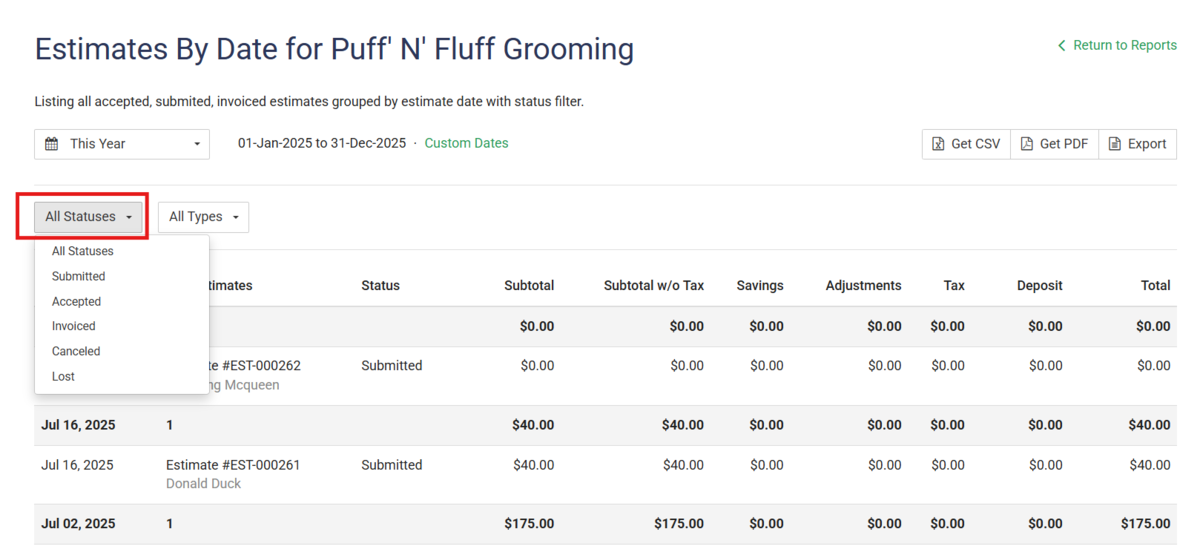
-
11 Feb 2025🗺️Introducing New Feature: Schedule Map
- Desktop App
- Feature Update
- Announcement
🚀 Introducing the Schedule Map Feature!
We’re excited to announce the launch of our new Schedule Map feature, designed to help you schedule jobs and sell more efficiently with advanced sales mapping tools.
What’s new?
-
Visualize customer and lead records directly on the map for smarter prospecting decisions.
-
Streamline field sales management and optimize your route planning.
-
Save time by scheduling jobs and managing your field team with ease.
Start using the Schedule Map today to take your sales and scheduling to the next level!
Learn More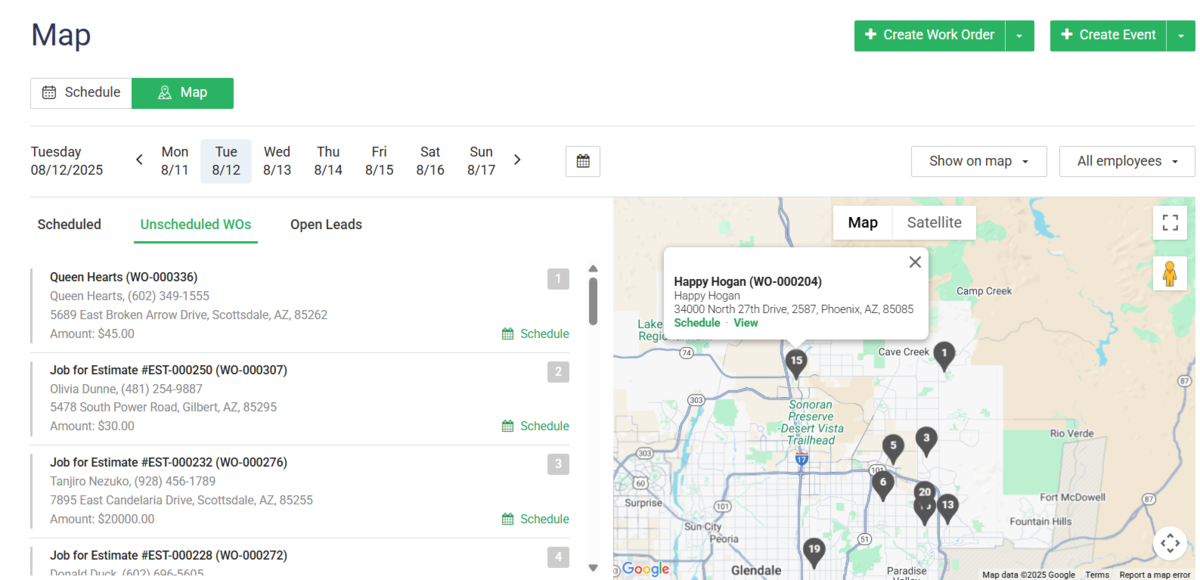
-
10 Feb 2025📢Feature Update – Set Default Sales Tax Rate for Items
- Desktop App
- Feature Update
📢 Feature Update – Set Default Sales Tax Rate for Items
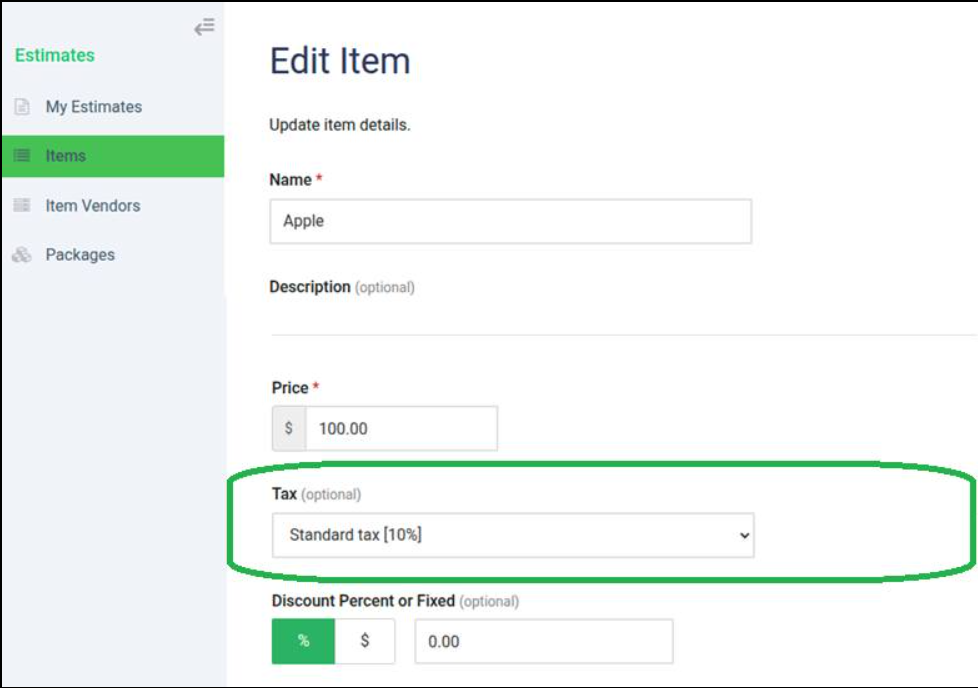
We’ve made it easier to manage taxes in your account! You can now set a default sales tax rate for your items, and it will automatically apply to all relevant documents.
How it works:
-
Go to your online account: Sales > Items
-
Set the item as taxable and choose the default tax rate
-
The tax will now automatically apply to Estimates, Invoices, Work Orders, and Credit Notes
-
05 Feb 2025🚀 Activity Log for Credit Card and Wisetack Actions
- Desktop App
- Feature Update
We’re excited to announce an enhancement to your admin experience!
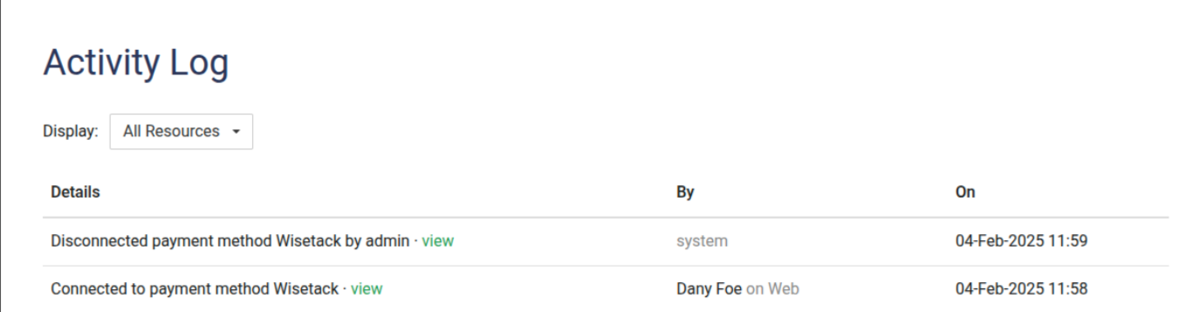
Now, you can easily track key actions related to credit card enable/disable and Wisetack connections right from your Activity Log. 🎯
What’s New?
-
🔒 See when credit cards are enabled or disabled for your business.
-
🔗 Instantly view when Wisetack is connected or disconnected.
-
👀 All actions are clearly visible in your Activity Log for better transparency and control.
This update makes it easier than ever to monitor important payment method changes and keep your records up to date.
-
05 Feb 2025🪲Bug Fix: Gate Code Now Displayed on Schedule Popup Screen
- Desktop App
- Mobile App
- Bug Fix
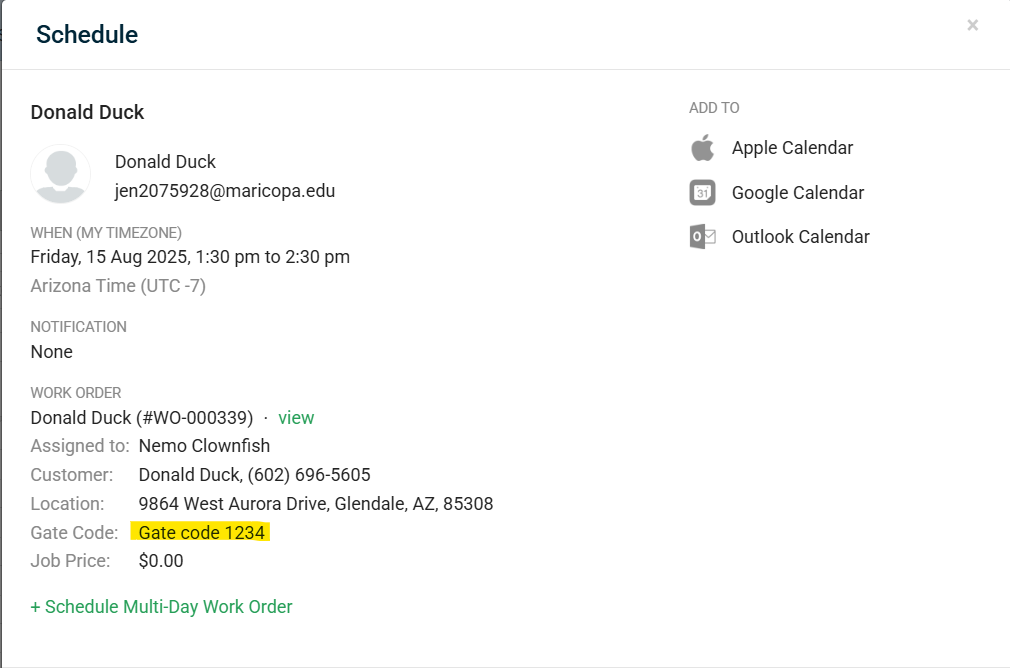
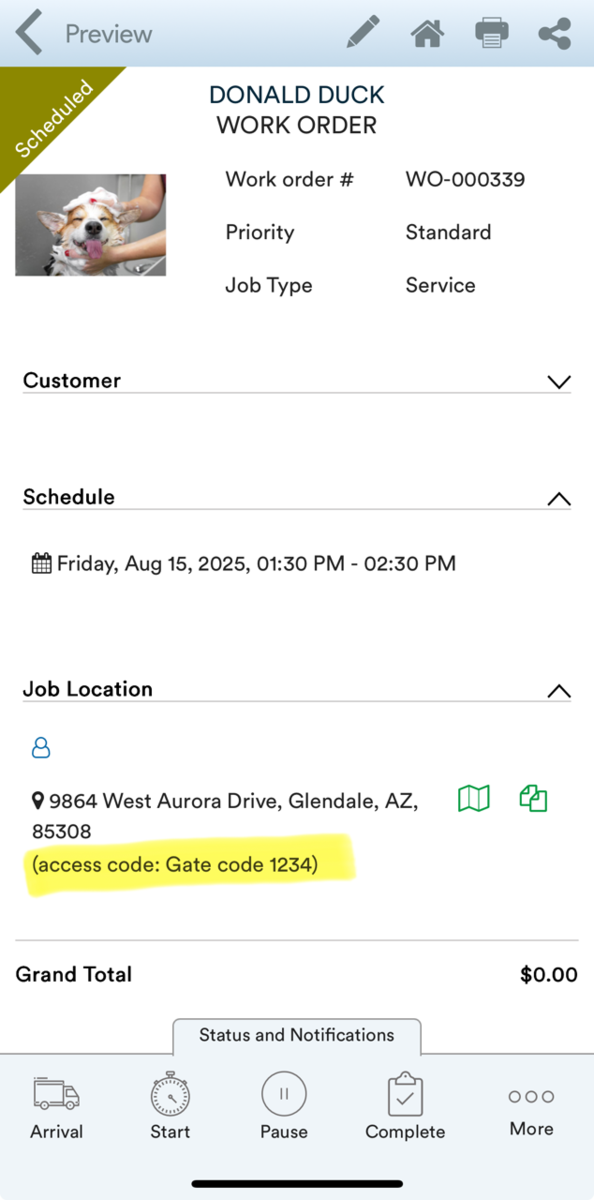
Bug Fix: Gate Code Now Displayed on Schedule Popup Screen
We’re excited to announce an update to the Schedule Popup Screen! The “Gate Code” is now clearly displayed below the address on both app and desktop, making it easier for you to access important entry information when scheduling events.
-
16 Jan 2025🐞 Bug Fix – Discounts on Child Recurring Work Orders
- Desktop App
- Mobile App
- Announcement
- Bug Fix
🐞 Bug Fix – Discounts on Child Recurring Work Orders
We’ve resolved an issue where discounts were not applying to child recurring work orders.
What’s fixed:
-
Discounts now apply correctly to all child work orders in a recurring series when discount is added to the Parent Work Order
-
Ensures accurate billing and customer satisfaction