Product Updates
From fresh features to behind-the-scenes improvements, this is where you'll find every update that makes our product faster, smarter, and better for you. Check back often — we're always building something new.
-
22 Oct 2026📢 Announcement: Updated Processing Fees Settings
- Feature Update
We’ve updated the Processing Fees settings in Markate to give you more flexibility when configuring your payment preferences!
Here’s what’s new:
- Credit Cards: You can choose the processing fee they want to apply to credit card payments.
- Debit Cards: Credit card processing fees will no longer apply to debit card payments.

- ACH Payments: You can configure ACH processing fees separately using a dedicated setting. Please know ACH payments are currently only available through Square as a payment processor

😊
-
15 Oct 2026✨ Customer Group Increase
- Feature Update
We’re excited to announce that we’ve increased the number of customer groups you can create in Markate to 150!
This update gives you more flexibility to organize your customers and manage your business more efficiently. Enjoy the extra room to grow!
-
17 Sep 2026💳 Update – WiseTack Financing Payments
- Feature Update
We’ve made an update to how WiseTack financing payments are processed in Markate.
When a customer chooses WiseTack as their financing payment method, any payment fees you have configured in Markate will not be applied to that payment.
This update ensures that WiseTack financing payments are processed without adding your standard Markate payment fees.
-
11 Aug 2026📢 Markate Update: Accepted Payment Methods
- Feature Update
📢 Markate Update: Accepted Payment Methods
We’ve made an update to how Accepted Payment Methods appear on your estimates and invoices!
If you do not have Credit Card (CC) selected as an accepted payment method in your settings, the credit card images/icons will no longer appear on your estimates and invoices. 💳
This update helps ensure that the payment methods displayed to your customers accurately reflect the options you accept.
Be sure to review your Accepted Payment Methods settings to make sure they are configured the way you want! ✅
-
11 Aug 2026📢 Markate Update: Payment Processors
- Feature Update
📢 Markate Update: Payment Processors
We have an important update for new Markate users!
Moving forward, new users will have the option to connect Square or PayPal as their payment processor. 💳
This change will help simplify the payment setup process and provide new users with two reliable options for processing customer payments directly through Markate.
If you’re a new user setting up your account, be sure to connect Square or PayPal to start accepting payments!
-
11 Aug 2026🚀 NEW MARKATE UPDATE: ONLINE BOOKING! 🚀
- Feature Update
🚀 NEW MARKATE UPDATE: ONLINE BOOKING! 🚀
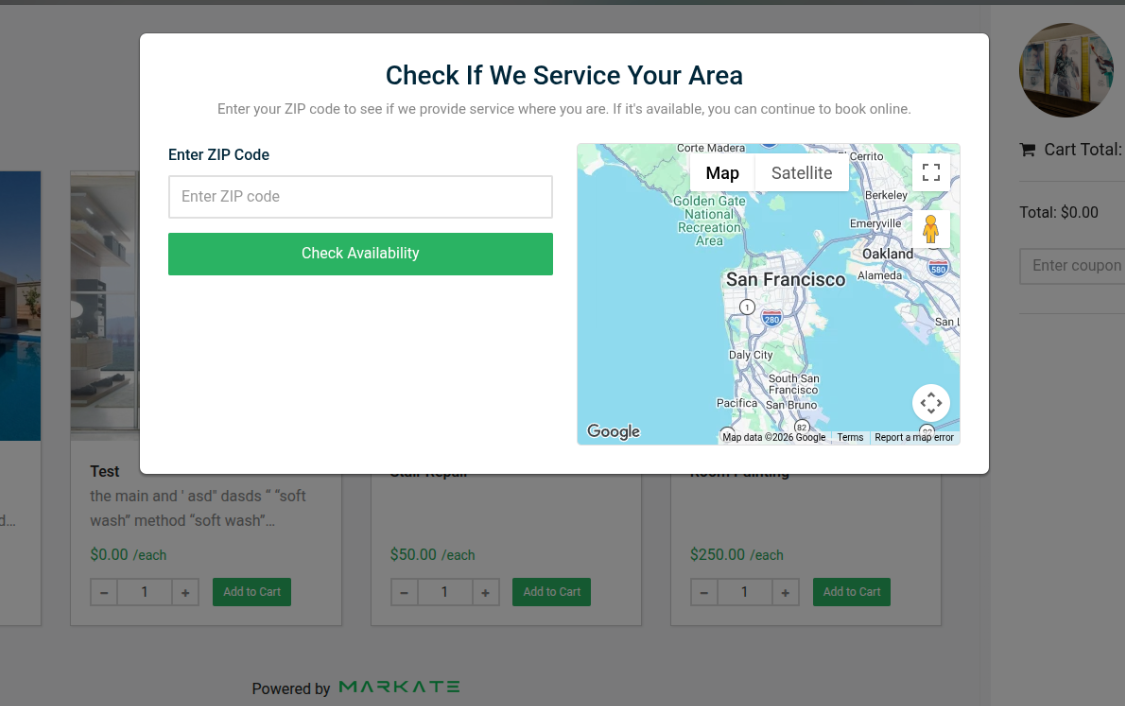
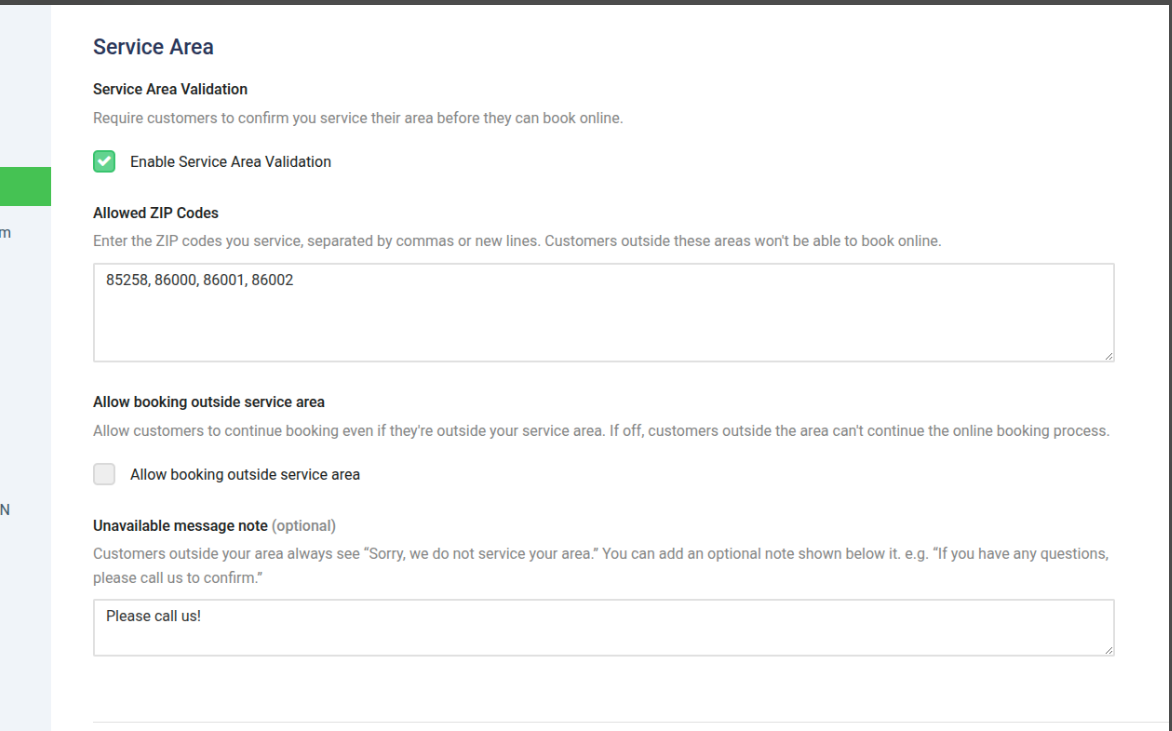
We’ve added a new option to validate ZIP codes with Online Booking! 📍
You can now set up ZIP code validation to help ensure customers booking online are located within the service areas you cover.
✅ Better control over your service area
✅ Prevent bookings outside your coverage area
✅ Make online scheduling more efficientHead over to your Online Booking settings and check out the new ZIP code validation option!
💡 Less time sorting through out-of-area bookings = more time focusing on your customers!
-
23 Jun 2026🚀 Feature Update: Employee Route Colors
- Feature Update
🚀 Feature Update: Employee Route Colors
Keeping track of your team on the route just got easier!
You can now assign specific colors to each employee, making it simple to identify who is assigned to which jobs directly on the route map and schedule.
This update provides a clearer visual overview of your team's daily assignments, helping you quickly see where everyone is located and improving route management at a glance.
How to Use It:
- Navigate to the employee's profile.
- Select a color for that employee.
- Save your changes.
- View the assigned color throughout the route and scheduling tools.
Enjoy a more organized and color-coded way to manage your team!
-
15 Jun 2026Product Announcement: Kate AI Now Helps Schedule, Reschedule & Dispatch Jobs
- Feature Update
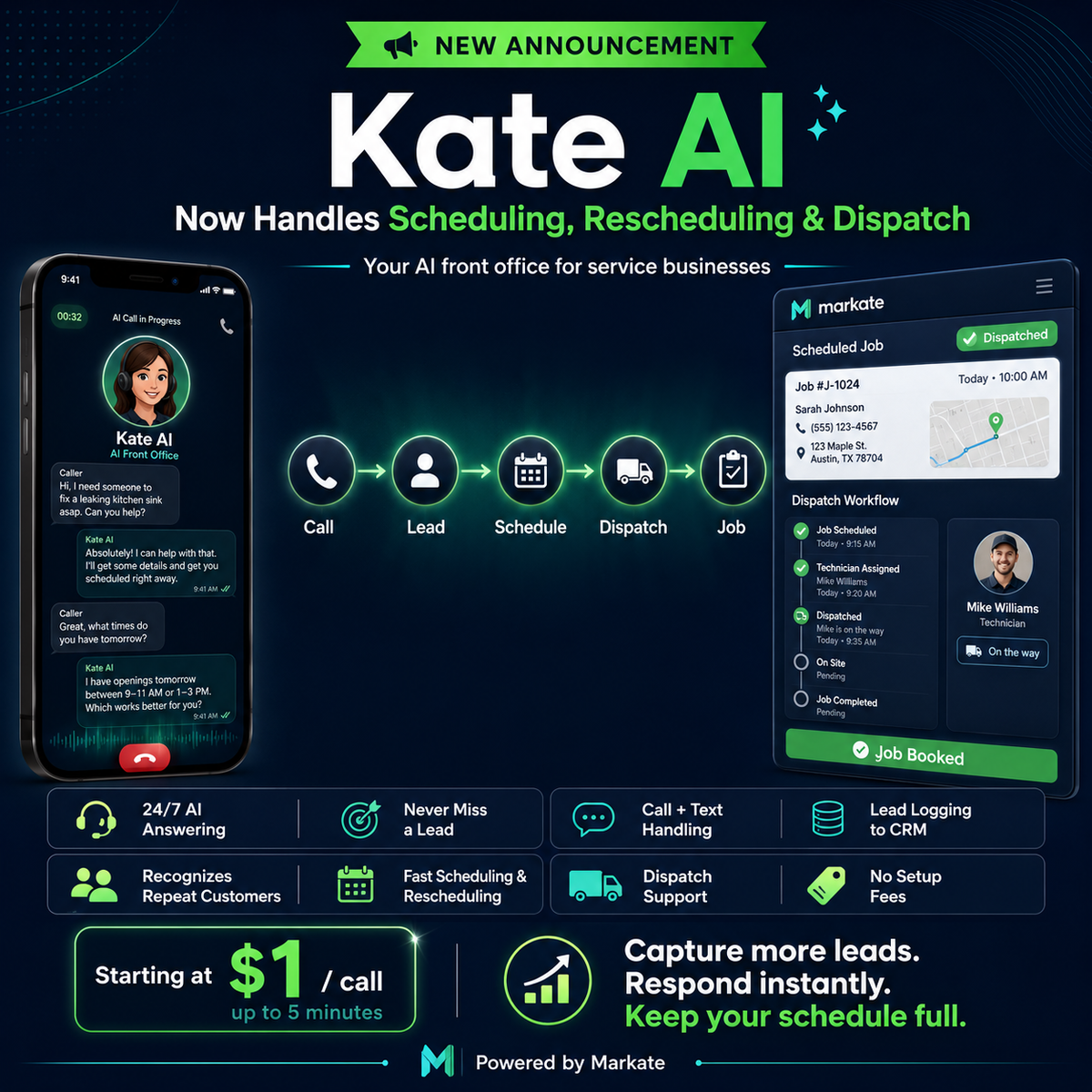
We’re excited to announce the next evolution of Kate AI — Markate’s AI-powered front office assistant for service businesses.
Kate already helps service pros answer calls, capture leads, and keep the pipeline full. Now Kate is becoming even more powerful with AI scheduling, rescheduling, and dispatch support.
Meet Your AI Front Office
Kate AI is designed to help service businesses stay responsive, organized, and booked — even when you’re busy on the job, after hours, or away from the phone.
With Kate AI, your business can:
✅ Answer customer calls 24/7
✅ Capture new leads automatically
✅ Collect customer details and job notes
✅ Recognize returning customers
✅ Send instant lead notifications
✅ Log conversations into Markate CRM
✅ Help schedule new jobs
✅ Reschedule appointments when needed
✅ Support dispatching jobs to the right team
✅ Keep your calendar and pipeline movingFrom Call to Scheduled Job
Kate AI helps reduce the back-and-forth that slows down service businesses.
When a customer calls, Kate can help gather the request, understand the service need, capture the details, and assist with the next step — whether that means creating a lead, helping schedule the job, rescheduling an existing appointment, or supporting dispatch workflow.
Call → Lead → Schedule → Dispatch → Job
Why This Matters
Service pros lose opportunities when calls are missed, follow-ups are delayed, or scheduling takes too long.
Kate AI helps your business stay available and responsive 24/7, so you can capture more opportunities and keep your schedule full without adding more office workload.
Key Benefits
Never Miss a Lead
Kate answers calls around the clock, even when your office is closed or your team is busy.
Faster Customer Response
Customers get instant engagement instead of waiting for a callback.
Less Manual Work
Kate captures customer information, notes, and call details so your team does not have to enter everything manually.
Better Scheduling Flow
Kate helps move customers from inquiry to appointment faster.
Easier Rescheduling
When plans change, Kate can support rescheduling and help keep the calendar organized.
Smarter Dispatch Support
Kate helps connect scheduled work to the right job flow, so your team can stay focused on getting work done.
More Professional Customer Experience
Kate speaks professionally, follows your business instructions, and helps customers feel taken care of.
Built Into Markate
Kate works with your Markate CRM, customer history, leads, jobs, and communication workflow.
Simple Pricing
Kate AI Receptionist is available with simple usage-based pricing:
$1 per call, up to 5 minutes
No setup fees. No long-term commitment.Built for Service Businesses
Kate AI is ideal for:
- Handyman businesses
- Pressure washing companies
- Window cleaning companies
- Cleaning businesses
- HVAC, plumbing, electrical, landscaping, painting, and other service pros
The Future of the Service Business Front Office
Kate AI is more than an answering service. It is becoming a full AI front office assistant that helps your business answer calls, capture leads, schedule jobs, reschedule appointments, and support dispatch — all connected inside Markate.
Learn More -
14 May 2026📢 The Voice of Mark AI
- Feature Update
He's here. And his voice is too. Introducing Mark AI — Kate's new counterpart and the smartest hire you'll make this year.
 Every call that goes to voicemail is a lead that's gone. Customers don't wait — they call the next contractor on the list.Mark AI answers every call, every time. He greets customers by name, captures their details instantly, filters spam, and keeps your schedule full — 24/7, no matter what your hands are doing.Now you have two AI receptionists to choose from. Pick Kate. Pick Mark. Pick the voice that fits your business best — because two is better than one.

-
14 May 2026🚀 Feature Update: Kate AI Receptionist Follow-Up SMS
- Feature Update
🚀 Feature Update: Kate AI Receptionist Follow-Up SMS
Kate AI just got even smarter!
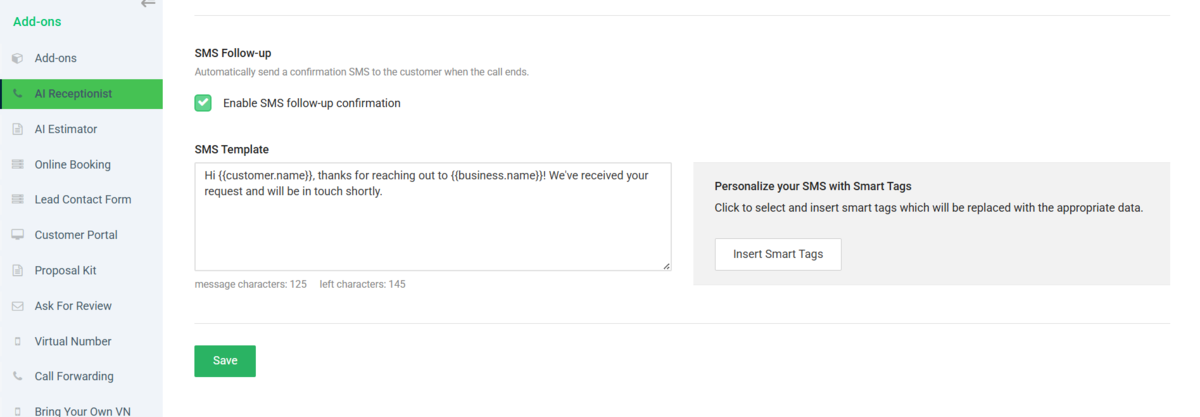
Kate AI will now automatically send a follow-up SMS message when someone calls in, helping you stay connected with leads and customers even faster.
This enhancement helps improve communication, customer engagement, and follow-up response times — all automatically.
-
24 Mar 2026📢 Feature Update: Employee Forgot Password
- Feature Update
📢 Feature Update: Employee Forgot Password
We’ve updated the Employee “Forgot Password” process to improve account security and management.
Now, when an employee selects the “Forgot Password” option, they will receive an email instructing them to contact their employer to reset their password.
This ensures that account access remains securely managed by the business owner or administrator.
If you have any questions, feel free to reach out!
-
05 Mar 2026📢 Feature Update: Bring Your Own Virtual Number and Virtual Number receive all messages now!
- Feature Update
📢 Feature Update: Bring Your Own Virtual Number and Virtual Number receive all messages now!
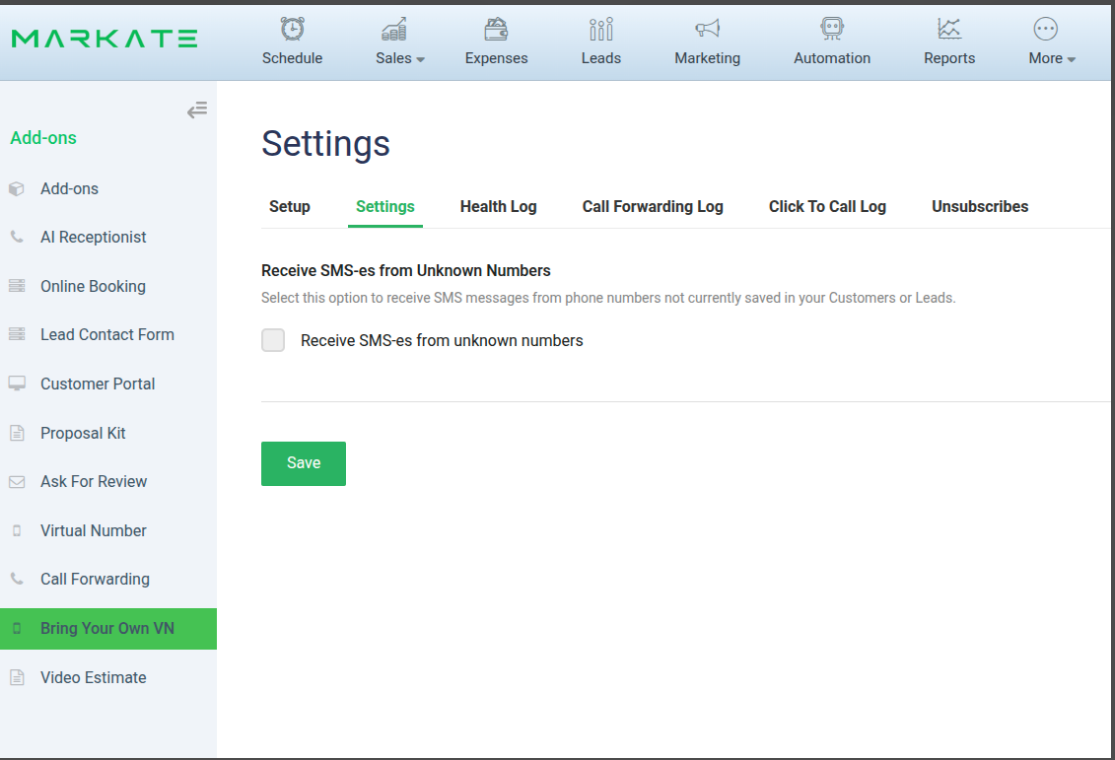
We’ve made an update to the Bring Your Own Virtual Number (BYOVN) & Virtual Number configurations.
There is now an option that allows you to receive SMS messages from all numbers, not just customers or leads. This enhancement provides more flexibility and makes it easier to support marketing efforts and broader communication through your virtual number.
-
18 Feb 2026📊 Feature Update: Upload .XLS & .XLSX Files to Expenses
- Feature Update
📊 Feature Update: Upload .XLS & .XLSX Files to Expenses
Managing expenses just got easier.
You can now upload .xls and .xlsx files directly into your Expenses—making it faster than ever to import and organize your financial data.
No more manual entry.
No more formatting headaches.Simply upload your spreadsheet, and we’ll handle the rest.
-
18 Feb 2026✅ Checklist Limit Increased!
- Feature Update
✅ Checklist Limit Increased!
You asked — we delivered.
We’ve increased the limit on checklists, giving you more flexibility to build, organize, and manage your workflows without restrictions.
Create more detailed processes.
Track more tasks.
Keep your team aligned — without hitting limits. -
09 Feb 2026🎉Product Update- Postcards are improved and trackable
- Feature Update
🚀 Postcards just got smarter—and fully trackable.
Our Postcard feature just leveled up with powerful new upgrades:
✅ Real-time delivery tracking
✅ Built-in QR code on every postcard
✅ Instant scans that drive customers straight to conversion
✅ Know exactly when your marketing hits the mailboxNo more guessing.
No more wasted mailers.Now you can track → engage → convert automatically—all in one place.
-
20 Jan 2026📢 Feature Update: Employee Schedule Filters Now Carry Over to Print
- Feature Update
📢 Feature Update: Employee Schedule Filters Now Carry Over to Print
You now have the option to retain employee filters when printing the weekday schedule.
With this update, any employee filters applied while viewing the schedule will carry over to the printed version, making printed schedules more accurate and easier to share—without needing to reapply filters.
-
17 Dec 2025📢 Feature Update: Additional Contacts & Tenant Notifications
- Feature Update
📢 Feature Update: Additional Contacts & Tenant Notifications
Additional Contacts and Tenants will now receive reminder notifications via email. This update helps ensure all relevant parties stay informed and up to date with important reminders.
-
15 Dec 2025📢 Feature Update: Mark Leads as “Unread”
- Feature Update
📢 Feature Update: Mark Leads as “Unread”
You can now mark a lead as Unread even after it has already been opened. This update makes it easier to revisit leads at a later time or signal to other team members that a lead still requires attention.
This enhancement helps keep follow-ups organized and ensures no opportunities are overlooked.
-
12 Dec 2025📢 Feature Update: New Notes Section on Work Orders!
- Feature Update
📢 Feature Update: New Notes Section on Work Orders!
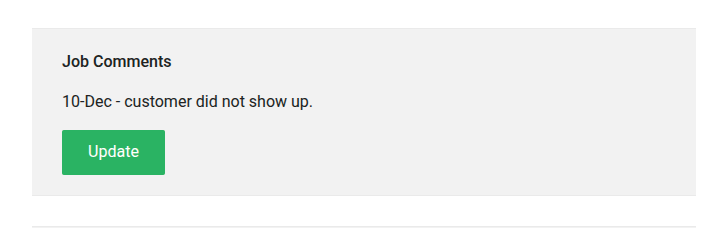
We’ve added an additional area on work orders where you can easily enter and save notes. This enhancement allows you to include more detailed information, improve communication, and keep everything organized in one place.
-
11 Dec 2025📢 Product Update: Attachments Now Available in Customer Emails!
- Feature Update
📢 Product Update: Attachments Now Available in Customer Emails!
You can now add attachments when sending an email directly from a customer’s profile. This makes it easier than ever to share documents, images, and other important files without leaving the page.