Product Updates
From fresh features to behind-the-scenes improvements, this is where you'll find every update that makes our product faster, smarter, and better for you. Check back often — we're always building something new.
- Desktop App
- New Feature
📢 New Feature Alert: Auto Payments for Invoices!
We’re excited to announce that you can now enable Auto Payment on invoices when using Square as your payment processor. If your customer has a card saved on file, Markate can automatically process the payment for you!
Important Details:
-
Auto payments are processed at 12:00 PM.
For example, if you create an invoice today and have auto payments enabled, the payment will run automatically at 12:00pm. Another example is if you create an invoice after 12:00pm and the due date is that same day, automatic payment will process following day at 12:00pm -
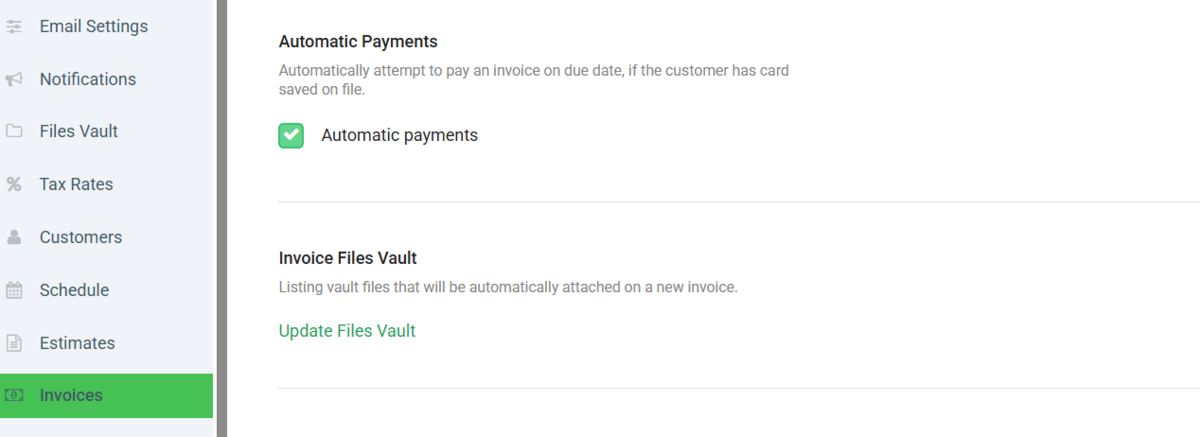
You can enable this feature by going to your Invoice Settings and turning on Automatic Payments.
-
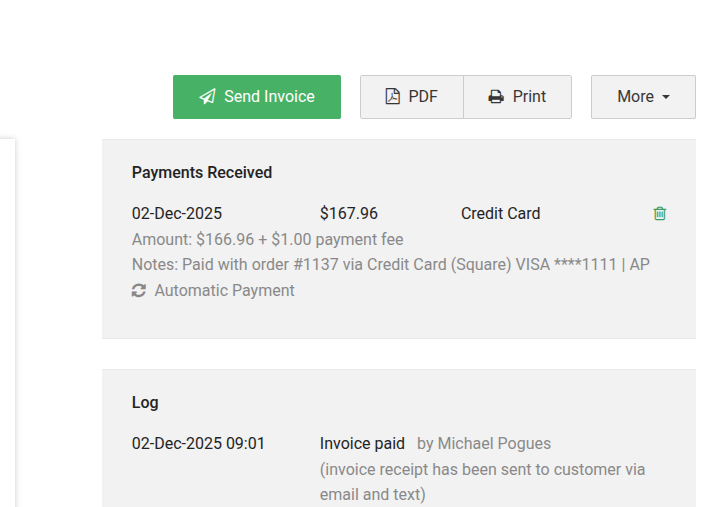
You will see all auto payment activity on the desktop site under the “Payments Received” section.
-
If an automatic payment fails, you will receive an email notification so you can follow up with the customer as needed.
- For Recurring Invoices the payment will be processed on the due date that is selected on the invoice. For example you have a Recurring Invoice set to create on the 5th of each month, the automatic payment will process at 12:00pm on the 5th of the month
- For security reasons we have allowed only one auto-payment per invoice per day and max 5 auto-payments total per invoice
If you have any questions, our support team is here to help!